Don't throw it all away: Caching an immediate-mode UI
How Blick’s UI Painter keeps the pixels it has already rendered, combines shapes and opacity groups, and saves work behind an immediate-mode UI.
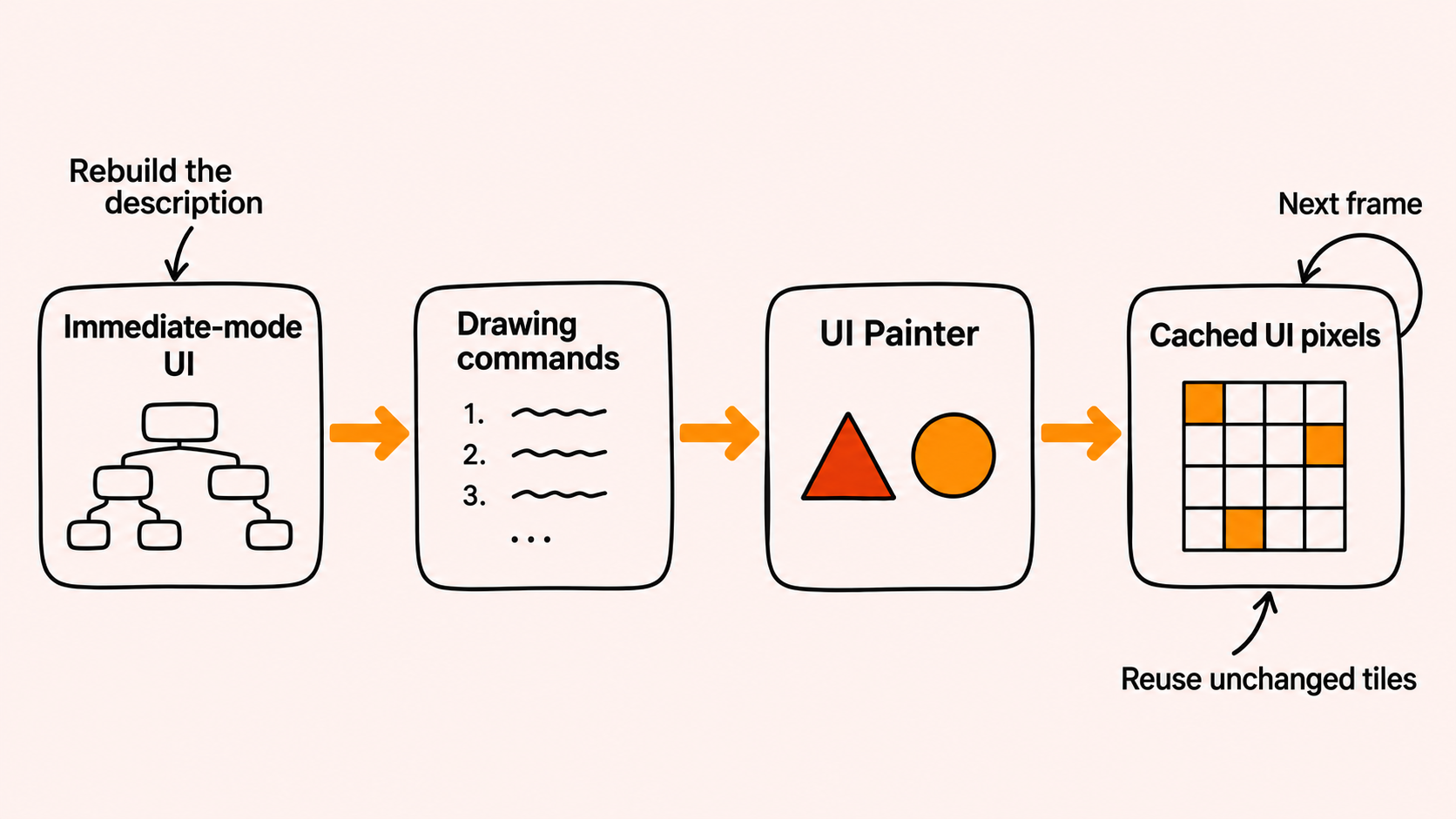
One common criticism of immediate-mode UI is that it repeats work. The application reconstructs its description of the interface each frame, even though much of the interface may be unchanged. The apparent tradeoff is simplicity of the programming model at the cost of repeated work.
I would like to show that this is not necessarily the case.
One straightforward rebuttal is that modern computers are really fast. If rebuilding the UI takes a millisecond at most, how much should we care?
And if you really dislike the idea of repeating work, then the simplest solution I can think of is to put your application to sleep when nothing is happening. This is what all immediate-mode desktop apps that I know of already do and is something that presumably suffices in many cases. It is also very easy to implement.
The story could end there as far as I am concerned, but things become less clear when we consider power usage. You may want your application to run nicely on laptops, phones, and tablets without draining the battery more than necessary. Furthermore, modern displays tend to have high resolutions and high refresh rates, which exacerbate this problem.
A blinking cursor, a moving playhead, or an animated control can prevent the application from sleeping and keep the interface updating while almost everything else stays unchanged.
At the same time, we want room to make visual design choices: translucent panels, animated controls, and dense layouts should all be things the renderer can accommodate.
For Blick, we have a dense interface that contains thousands of such elements, both big and small. Rendering it shares the machine with media processing and other applications.
The basic approach we ended up with is to attach a cache to the rendering side of that system. The UI can describe the whole interface again while the renderer retains the pixels it has already produced and repaints only the parts whose rendering inputs changed.
Reconstructing the UI and repainting its pixels are separate kinds of work. An immediate-mode frontend can coexist with a renderer that remembers its previous output.
That is what I would like to showcase here.
We have some measurements to go with that. In a short scripted light-editing test on an unplugged M3 MacBook Pro, the macOS CPU and GPU power estimates together were about 20% lower with caching. I will get into what we can conclude from it below.
This post focuses on the current Metal backend where specific measurements or examples are required. But all the same things apply to our other backends as well: how the cache works, and how a small rendering language interpreted on the GPU makes it possible.
Putting a cache behind the UI
Imagine hovering over a button in a window. The button changes its color to indicate that it is hovered and clickable. Nothing else in the window changes. We may rebuild the UI tree and emit a stream of drawing commands for the whole window based on that tree, but most of those commands still describe the same things in the same places. It would be nice to keep the pixels we already have for those parts.
To do this, the renderer, or the painter as we like to call it, splits the window into tiles and finds the commands that can affect each one. We calculate a hash from those commands, including their order, and compare it with the hash from the previous frame. If it matches, we keep the pixels. Otherwise, we paint that tile again.
The nice thing about doing this in the renderer is that the UI system doesn't have to keep a separate list of changed widgets for it. We can work out what needs repainting from the drawing commands, even if the UI tree itself was rebuilt. And we can do it entirely on the GPU!
Of course, rebuilding the tree, doing layout, and producing commands still cost something. Checking for changes also takes work. What matters is how those costs compare with the work we avoid. The measurements later in this post give us one concrete example.
Let's first look at what we give the painter to work with.
A small rendering language
By the time a command reaches the painter, layout has already happened. We know where the shapes go, what colors they have, where they should be clipped, and which textures they use.
The painter doesn't need to know what a popup menu, a timeline, or an audio clip is. The application and UI system take care of that. The commands it understands are fairly basic:
| Command family | What it expresses |
|---|---|
| Analytic shapes | Rectangles, circles, lines, triangles, rings, and diamonds |
| Textured shapes | Images, glyph coverage, and results from other rendering passes |
| Shape-group boundaries | Combine geometry, then apply a common appearance |
| Alpha-barrier boundaries | Composite a collection of commands with a shared opacity |
In the Metal backend, each GPU command takes up 64 bytes. They all have the same size, and the shader reads the fields it needs for the particular operation.
I think of this as a small rendering language because some commands affect how we process the ones that follow. We can begin a group of shapes, for example, or start collecting drawing operations that should share one opacity value. I will get into both of those in a moment.
So the shader looks a bit like a small interpreter. It walks through the commands and keeps a little state between them. The operations it knows about are all built into the shader.
This also gives us some room to play with how the UI looks. We can build a shape from several pieces and outline the result, or fade a whole popup together. Those choices are expressed in the same command stream that we split into tile lists and check for changes. Let’s look at how we process that stream, and then at what these operations let us draw.
Giving each tile a smaller program
We could simply run through every command for every pixel, but that would be a lot of unnecessary work. Most shapes only cover a small part of the window. We first want to find the commands that could matter at a particular location.
This is where the tiles come in. We divide the output into a grid and process it using ordinary compute shaders. These tiles are just part of our own organization of the work.
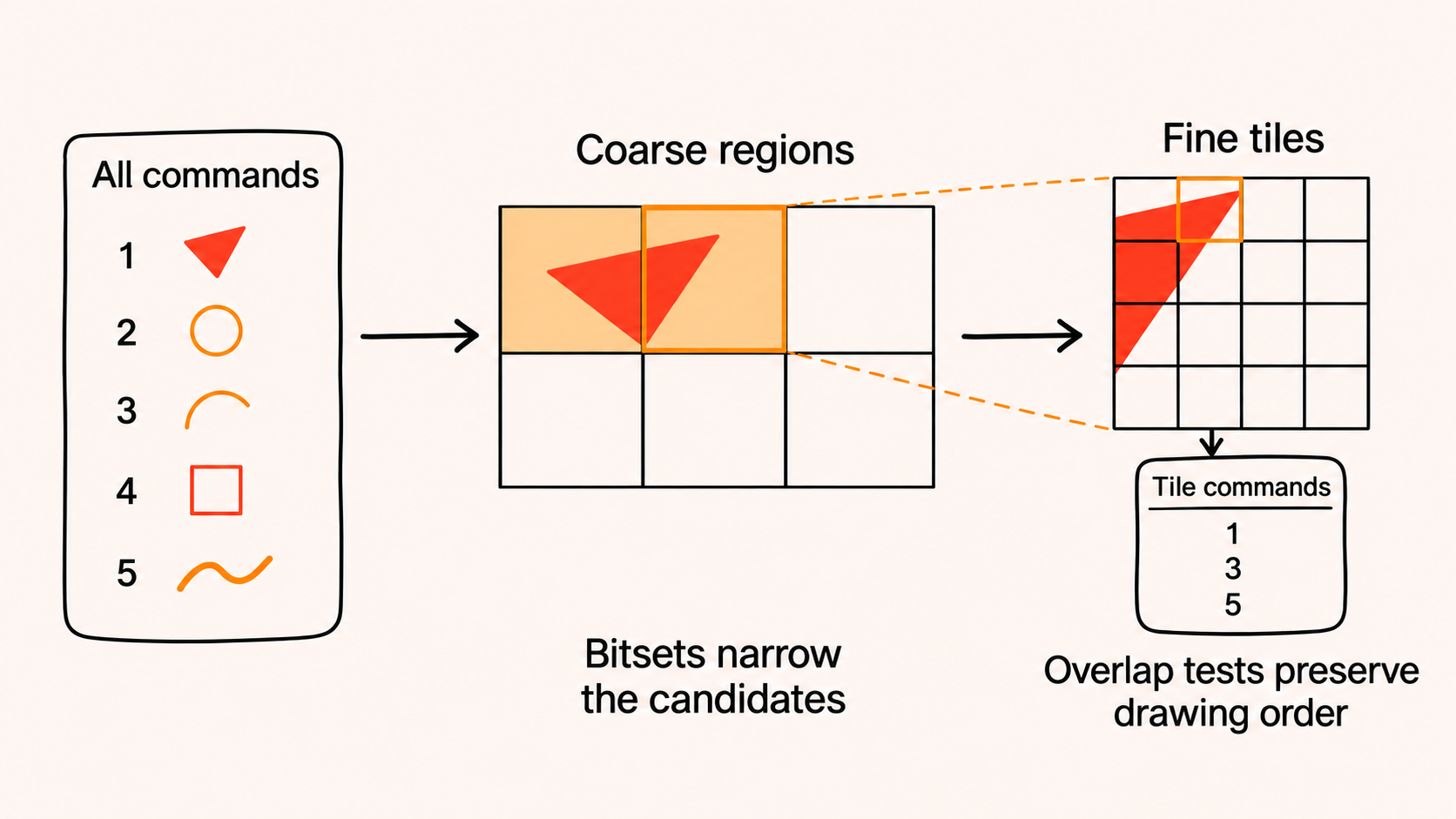
In a preprocessing pass, we work out the area each command can affect and record which coarse regions it overlaps. We store this in bitsets, where a set bit means that a command might matter in that region. Each fine tile then checks the candidates from its coarse region and collects the ones whose bounds overlap it.
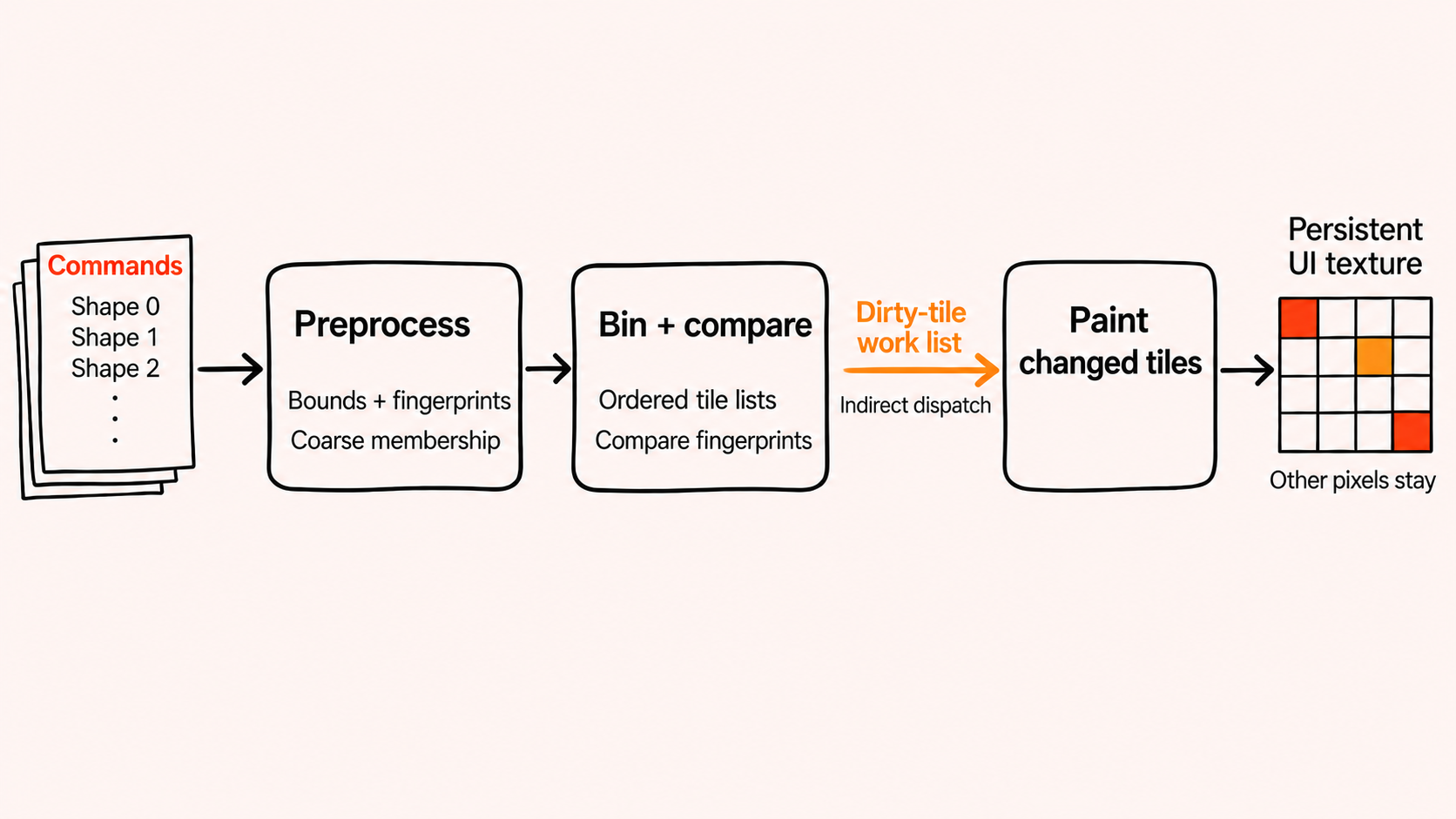
We have to keep the drawing order intact while doing this. With alpha blending, swapping two shapes can change the result. We want each tile to end up with a shorter list of commands that still produces the right image for that region.
One detail that is easy to miss is that group boundaries need bounds too. A command that begins a group doesn't draw anything by itself, but leaving it out of a tile's list would change what happens to the shapes that follow. We need to include it wherever the group matters.
Similarly, a glow or shadow can reach beyond the shape that produced it. Its bounds have to include that extra area, or we will miss pixels that need painting.
Painting a pixel
Once we have a tile's list, each pixel walks through it from front to back.
For an analytic shape, we evaluate a distance function at the pixel's position. This tells us where the pixel is relative to the shape's boundary, which we use to work out edge coverage, fills, and outlines. For textured shapes, we also sample the image or coverage data and blend the result into the pixel.
Going from front to back has a useful property: once the result is fully opaque, anything behind it can no longer contribute. We can stop there, as long as we aren't inside a group or opacity operation that still needs finishing.
The shader keeps the color and opacity it has accumulated so far in local state.
So we get to control both how we combine the shapes and when we have done enough work for a pixel.
Drawing several shapes as one
Suppose we build an icon from a few overlapping shapes and want to put an outline around it. Outlining each shape separately would also draw the boundaries inside the icon. What we usually want is one outline around the combined shape.
This is what shape groups are for. Inside a group, we combine the shapes' distance values. When we reach the end, we apply the fill and outline to the combined result.
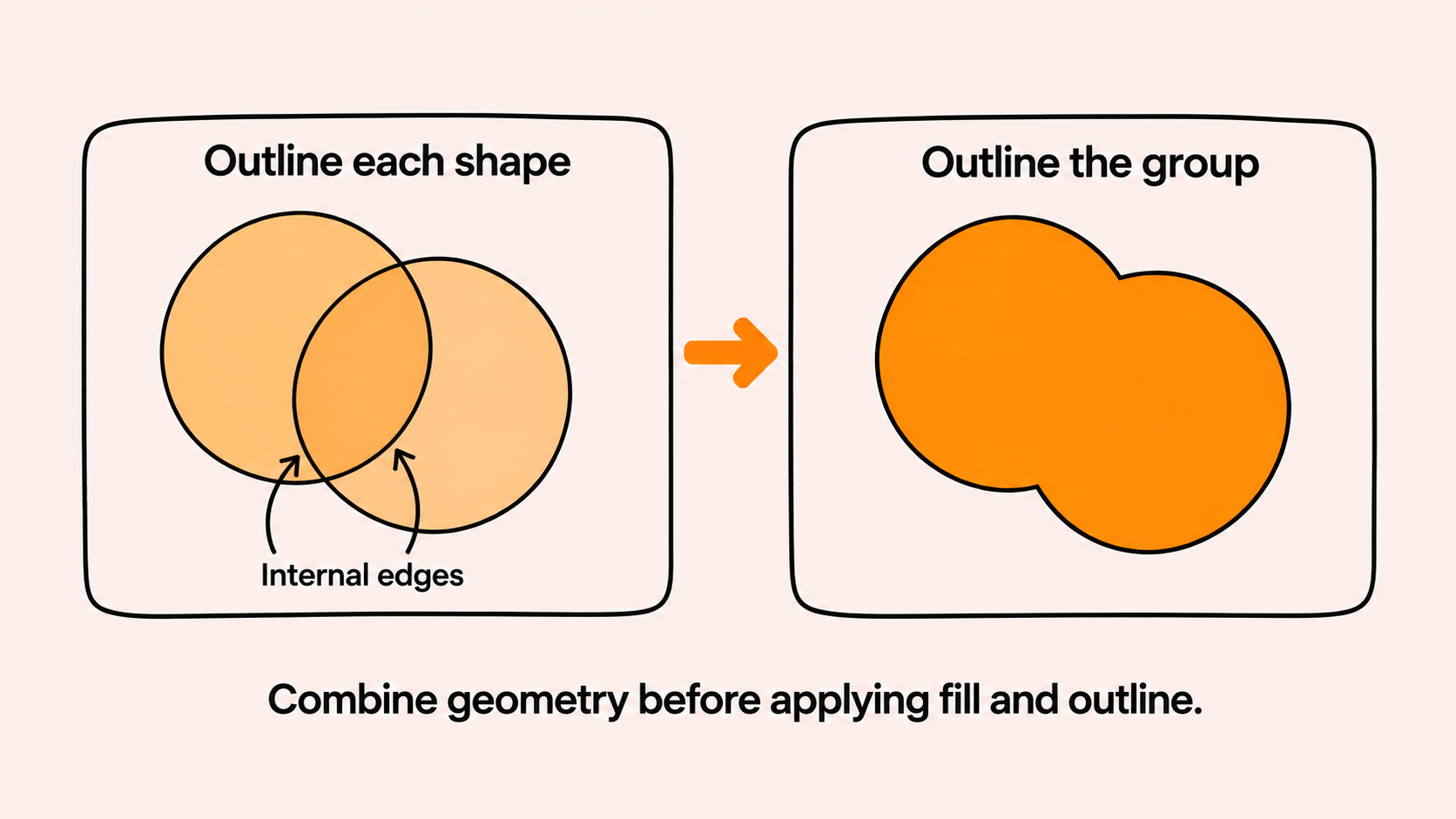
The UI can therefore assemble these visuals from existing shapes without us writing a special shader for each one. We can also use the group's geometry to draw a glow, inner glow, or shadow. Where we put those operations in the command stream determines how they blend with everything else.
There is a small catch here: combining distance functions doesn't necessarily leave us with an exact signed distance everywhere. Smooth blends in particular need some care when we use the result to draw an outline.
But the basic idea is quite convenient. We can change the shapes that make up an object and then give the whole thing a common appearance, using operations the painter already understands.
Fading a whole popup
Another case where drawing everything independently doesn't quite work is fading a popup. Suppose it has an opaque background and opaque text, and we want the whole popup at 50% opacity. We need to draw the text over the background first, then fade the combined result.
If we just give both elements 50% opacity, the background shows through the text. Where they overlap, the combined opacity is 75%. That is a different image from the one we wanted.
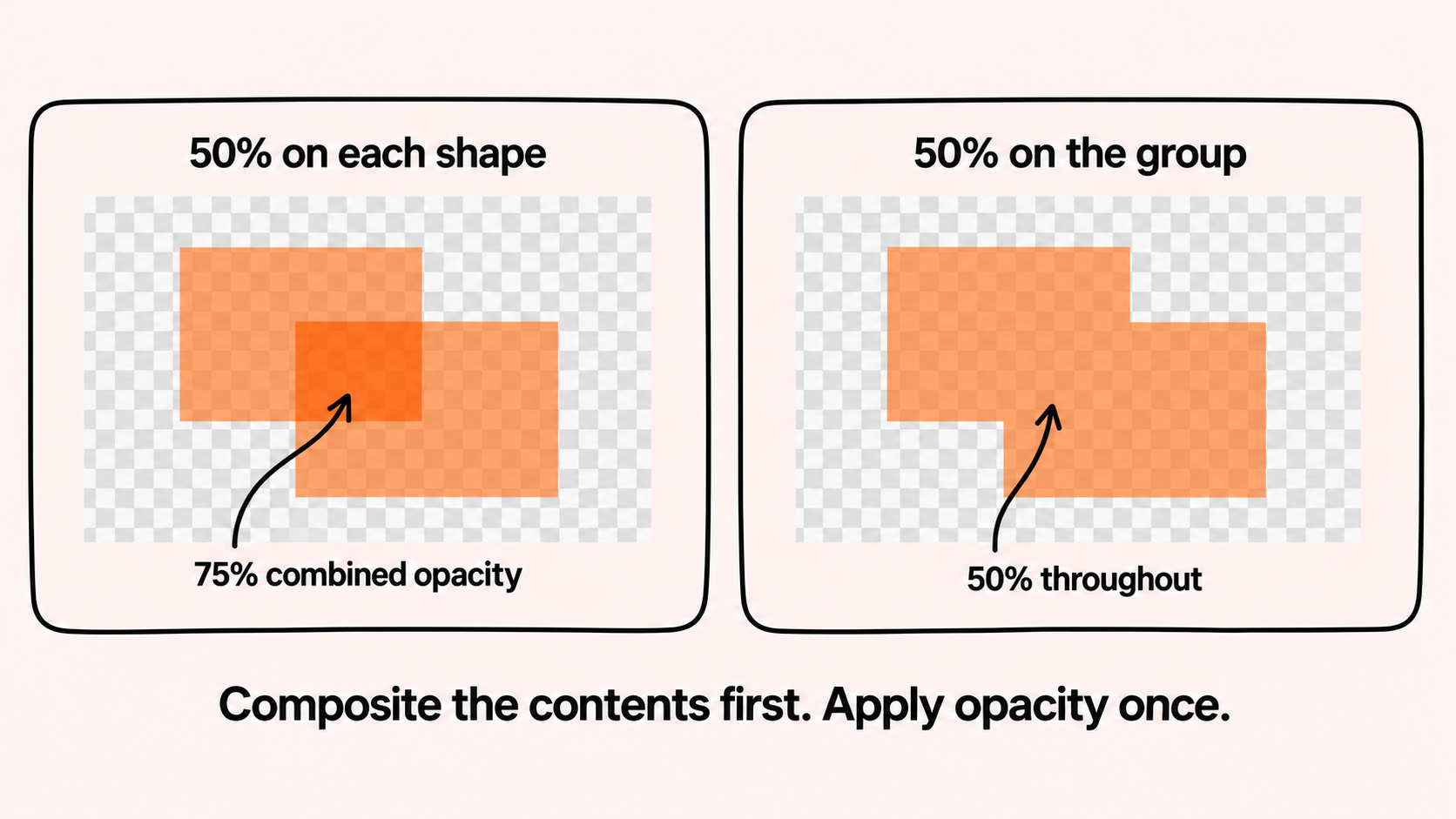
We handle this with what we call alpha barriers. When we enter one, the painter saves the result it has accumulated so far and starts a separate result for the popup. At the end, it applies the popup's opacity and combines the two. From the UI side, we only need to specify the fade at the root of that subtree.
Credit goes to Anton Mikhailov for giving us this idea.
All of this happens in the pixel's local shader state. We don't need to allocate a separate offscreen texture for the popup.
At the moment, we only support one active alpha barrier at a time, so they can't be nested. This also keeps the amount of state we carry around per pixel small.
What about waveforms and other special visuals?
Blick has some things to draw that need more than shapes and colors. Audio waveforms and video gradients, for example, need access to media data. If we put all of that directly into the painter, it would have to know more and more about the application.
In the Metal backend, we draw these in a separate effects pass and store the results in atlas textures. The painter then gets ordinary textured drawing commands for them. Glyphs also reach the painter as coverage in an atlas, although how we generate that coverage is a topic of its own.
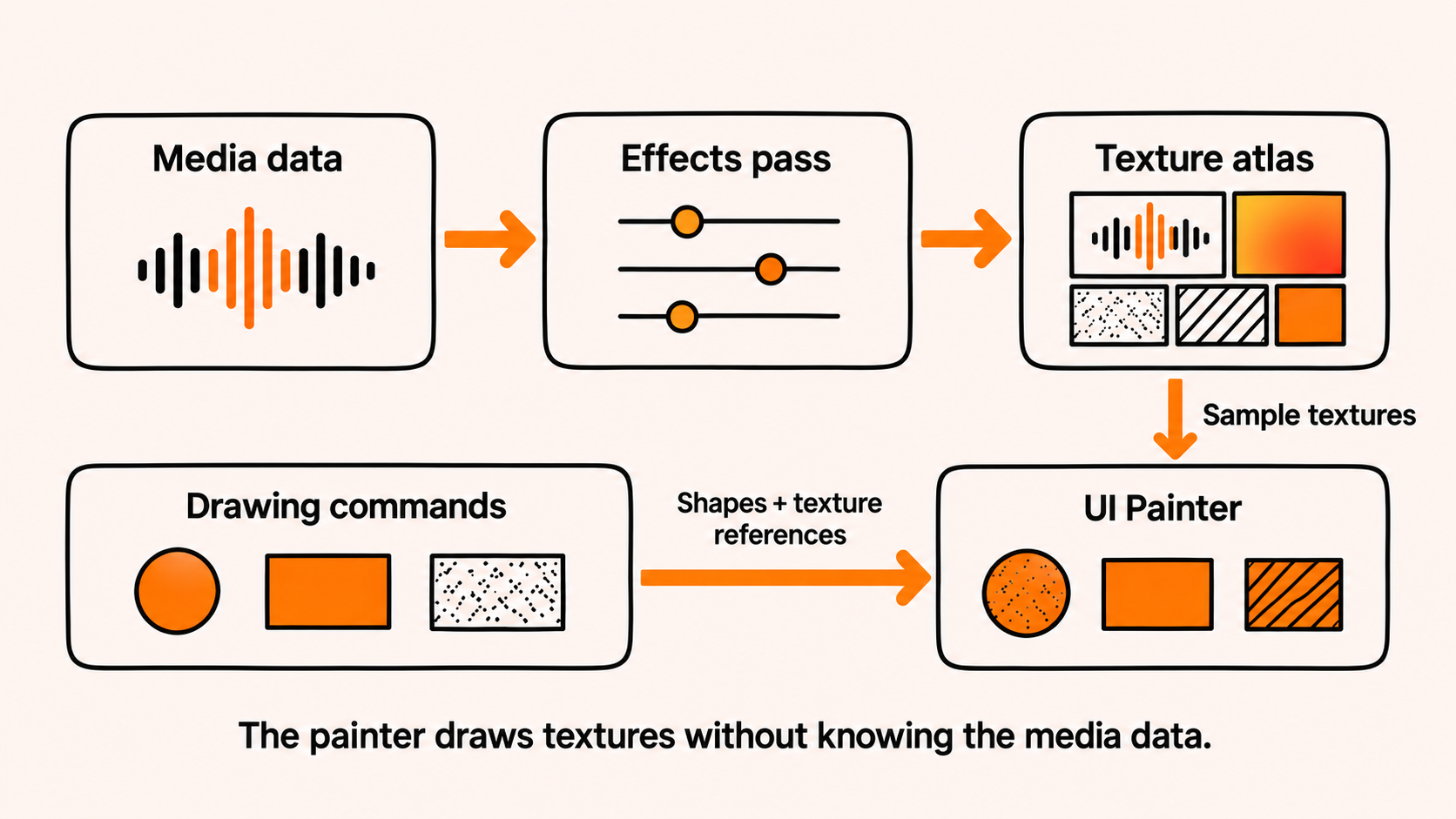
This lets us work on application effects without teaching the painter about their data. As far as the painter is concerned, it just needs to sample the resulting texture and blend it with the other shapes.
We do have to distinguish between keeping space in an atlas and keeping the image stored there. Just because the allocation still exists doesn't mean its contents are up to date. The effects code tracks whether the content has been rendered and includes content revisions in the cache inputs where needed.
Can we keep these pixels?
After binning, we have a list of the commands that matter to each tile. We can use that same list to decide whether we need to paint it again at all.
That includes the operations we just looked at. A combined shape or a faded popup still comes down to commands and their inputs. Changing a group’s outline or a popup’s opacity needs to invalidate the affected tiles, just like changing a rectangle’s color. If those inputs stay the same, we can keep the finished pixels, including all that compositing work.
The GPU calculates a hash from the tile's commands in drawing order. If it matches the hash from the previous frame, we leave that part of the UI texture alone. Otherwise, we append the tile to a list of work to do.
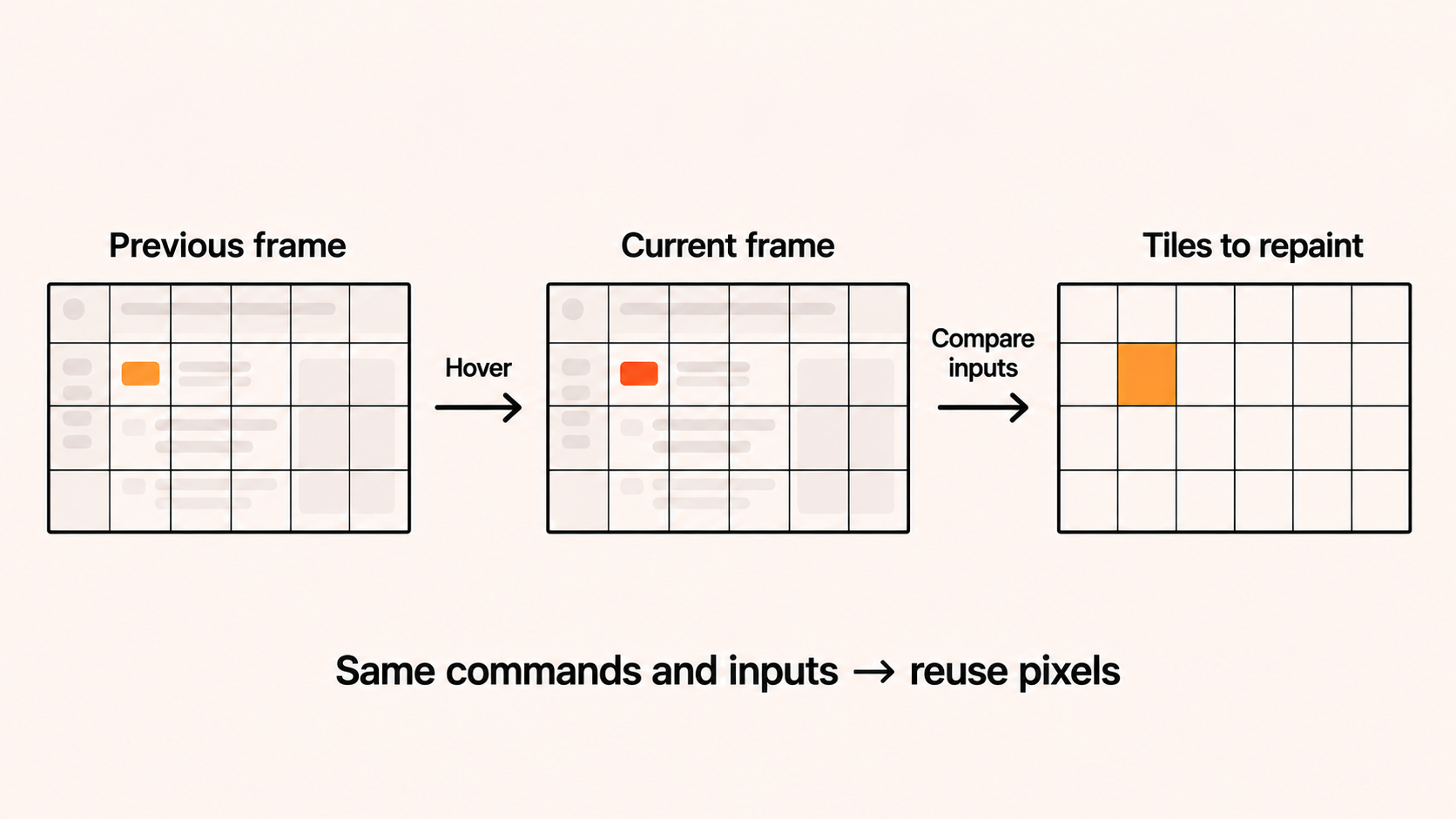
The GPU also produces the count used to dispatch the paint pass. This means we can paint the changed tiles without first sending the list back to the CPU.
We hash the command contents and their order. We are not comparing pixels to pixels. Different commands that happen to produce identical pixels can in theory cause us to repaint a tile unnecessarily.
A rectangle can also stay in exactly the same place while the image inside it changes. We have to include texture-content changes and animation in the invalidation logic too. Just checking the geometry would miss those.
Currently, we can skip work at two levels. First, we check whether the commands and their dependencies have changed, whether any effects need rendering, and whether the cache was explicitly invalidated. If none of those require work, we can skip the painter entirely. When it does run, the tile hashes still let us skip painting unchanged regions.
There is also a fairly straightforward way to check whether we are keeping pixels that should have changed. We could replay the same UI interactions with caching enabled and disabled, capture the results at matching points, and compare the images. With the same inputs and animation times, both should produce the same image. The uncached renderer would give us a useful reference for catching stale pixels after things like scrolling, resizing, or changing a texture. We haven't automated those checks yet, but having that reference makes the caching behavior easier to test.
This is the part I find useful for immediate-mode UI. We can describe the interface again and still keep much of what the renderer did last time. Layout, command generation, preprocessing, and presentation have their own costs, but we don't have to repaint everything just because we rebuilt the UI.
What does this cost us?
Of course, all of this comes with some overhead. We are doing extra work to find out which work we can avoid.
Binning and hashing take GPU time before we even start painting. Scrolling or animating large parts of the interface can change many tiles at once. If we have lots of translucent elements stacked on top of each other, we also get fewer opportunities to stop processing a pixel early. And the effects atlases need storage, tracking, and rendering work of their own.
Our tile lists currently have a fixed capacity too. That limits how many commands can overlap in one place, including group and barrier commands. It is a constraint on what this implementation can handle, which matters alongside how fast it runs.
To keep the bookkeeping reasonably small, we use SIMD-group operations to build the tile lists cooperatively, with temporary results in threadgroup memory. Compact commands and indices also help with how much data we need to move around. Whether that effort pays for itself still depends on what we are drawing.
How much does it save?
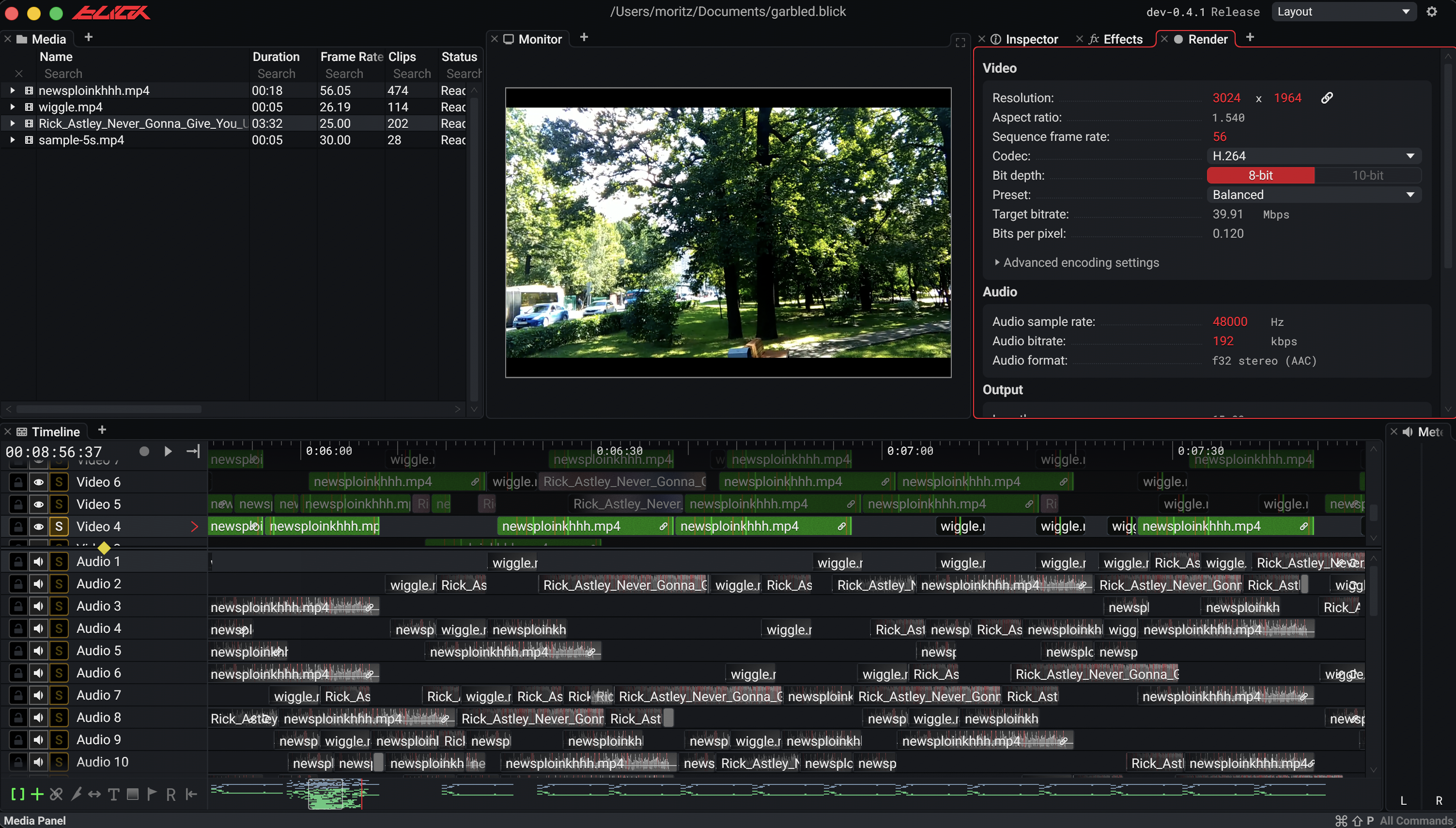
To put some numbers behind this, we ran a scripted light-editing session on my M3 Pro MacBook Pro, unplugged, with the cache enabled and then with full repainting forced. It mixed pauses with playback, scrubbing, moving clips, and editing titles. Both versions could sleep when nothing was happening. The difference was whether we reused pixels when the application did update.
Across two paired comparisons, macOS estimated average CPU + GPU power at 0.304 W with caching and 0.380 W with forced repainting, about 20% lower. Both pairs favored caching. These estimates cover the machine’s CPU and GPU, including other processes; they aren’t a measurement of the whole laptop or Blick alone.¹
For the whole laptop, the cumulative battery telemetry suggests 3.44 W with caching versus 3.99 W with forced repainting, about 14% less power. Assuming 60 Wh of usable battery energy, that works out to about 2.4 extra hours if we kept doing this light-editing workload: roughly 17.4 hours instead of 15.1. That is a preliminary projection from a short test, rather than a measured battery rundown.
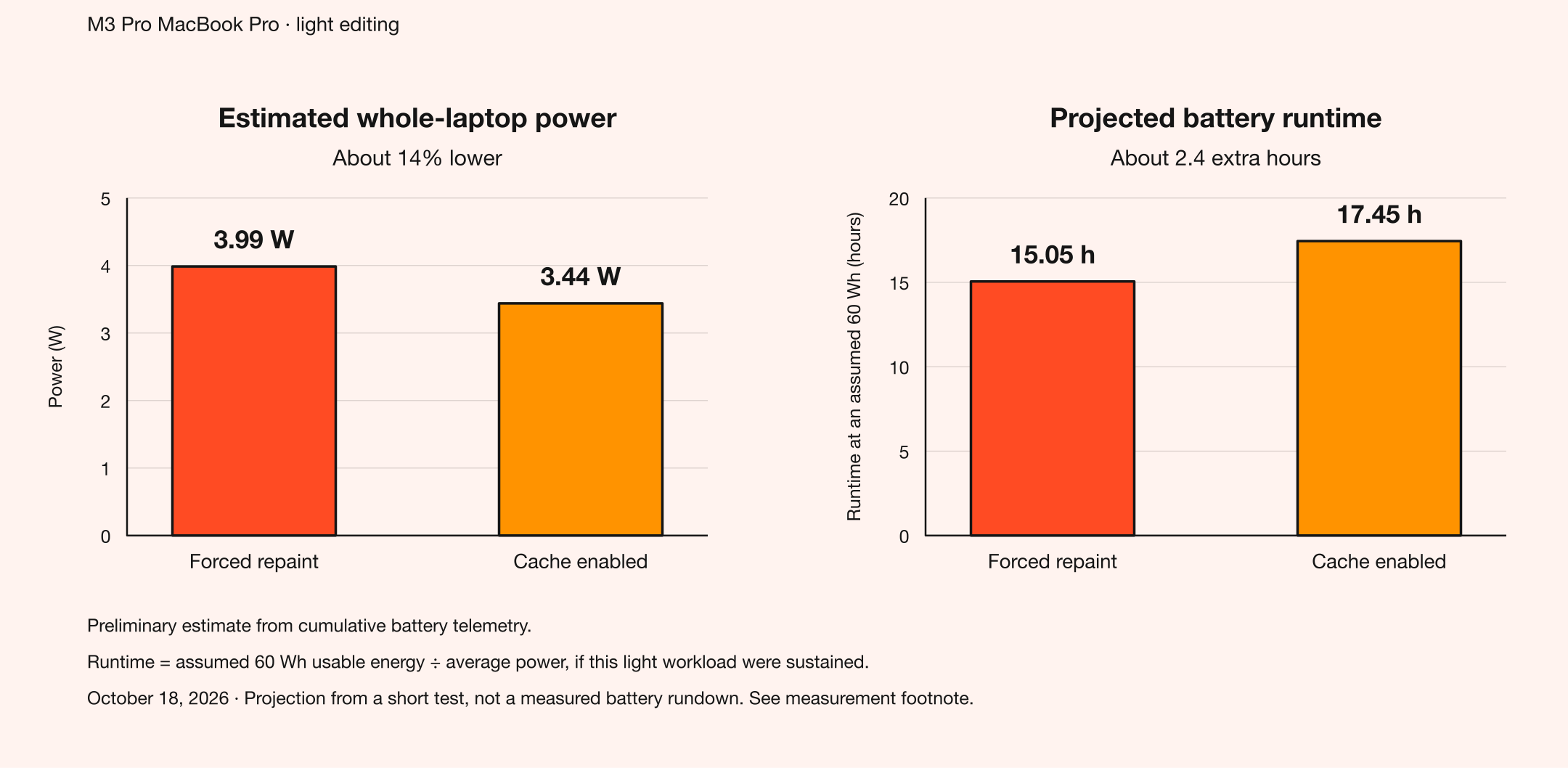
We also painted roughly 94% fewer tiles and spent 87% less GPU time in the painter. That is a substantial amount of painting we avoided while running the same editing sequence.
For me, this is useful evidence that the cache makes a practical difference even when both versions can idle. Longer measurements should help establish how well the battery-life projection holds up.
Where the ideas came from
This design came from putting a few existing ideas together. I would like to give credit to the people whose work helped us get here.
rxi's Cached Software Rendering describes the caching idea very directly: collect drawing commands, hash them into a grid, and redraw the regions whose hashes changed. The application can describe everything again without having to track dirty regions itself. It is written about a software renderer, but the useful part for us was that separation between describing the UI and deciding which pixels need repainting.
Gareth Thomas's Compute-Based GPU Particle Systems, presented at GDC 2014 while at AMD, showed how tiled compute rendering could handle lots of overlapping, alpha-blended particles. The GPU Particles sample includes the implementation. Particles might seem a bit far removed from UI, but the rendering problem has something in common: lots of shapes layered over the same pixels. This was an important inspiration for doing the painting and blending ourselves in a compute shader.
Wessel Mast's UIPainter: Tile-Based UI Rendering in One Draw Call, presented in 2024, brought tiled rendering and signed distance fields together for Guerrilla's Decima editor UI. That was the other major piece: use a spatial grid to narrow down which shapes each pixel needs to evaluate.
Our approach combines these ideas on the GPU. The tiles give us both a way to make painting cheaper and a way to decide whether painting is needed at all. And, as mentioned in the popup example, Anton Mikhailov gave us the idea for alpha barriers, letting us apply group opacity within the pixel's local shader state.
The takeaway
The idea I hope is useful beyond Blick is fairly simple: you can put a rendering cache behind an immediate-mode UI. Rebuilding the description doesn't mean we have to throw away the pixels we already produced.
In our case, the tile lists help in two ways. They give each pixel fewer commands to process, and they give us something to hash when deciding whether to keep the previous result. When we do need to paint, going from front to back also lets us stop once the remaining shapes can't contribute.
That gives us a way to address some of the repeated work while keeping the immediate-mode programming model. The short light-editing experiment supports a CPU/GPU power benefit on this MacBook. I would still like to explore heavier workloads and other hardware to see how far that carries, and where the bookkeeping stops paying for itself.
I also like the flexibility this gives us when building the UI. Shape groups let us assemble visuals from smaller pieces, and alpha barriers let us fade a collection of elements together. The command stream describes how to draw them; the tile lists tell us where those commands matter; and the cache lets us keep the result when the inputs haven’t changed.
¹ Measurement note. Tested October 18, 2026 on an unplugged M3 Pro MacBook Pro at 60 Hz, roughly 50% brightness, and a 2400 × 1500 framebuffer. Four four-minute trials formed two paired comparisons, with both modes allowed to idle. CPU/GPU estimates use powermetrics over each trial's middle two minutes; painter work totals cover the full trials. This is a small, synthetic light-editing test.
Whole-laptop power uses cumulative AppleSmartBattery telemetry whose accuracy we have not independently validated. The battery figures remain preliminary, and runtime assumes 60 Wh of usable energy rather than a measured rundown.
Cover image: NASA, Apollo Operations Handbook (1969). Source.